Getting Started with SiteWhiz
Welcome to SiteWhiz – your AI-powered platform for managing construction projects. This guide gets you up and running in about 10 minutes.
What is SiteWhiz?
SiteWhiz helps construction professionals manage projects without drowning in paperwork. The AI reads your documents, organizes site photos, and turns voice notes into concrete action items – so you can focus on building, not administration.
The core idea: Speak, take photos, forward emails – SiteWhiz turns it all into organized, actionable information.
Your First Login
When you receive your invitation email, click the link to set your password and access SiteWhiz.
Password Tips
Use a password manager to generate a strong, unique password. You use this for logging in on both desktop and mobile.
📋 Detailed Login Steps
- Open the SiteWhiz invitation email
- Click the Set Password button
- Enter a strong password (minimum 8 characters)
- Confirm your password
- Click Create Account
- You are redirected to your project overview
Understanding the Interface
The interface is your mission control – see all projects, recent activity, and urgent items at a glance.
What you see:
- Projects: All active construction projects
- Recent Items: Latest actions, issues, and decisions across projects
- Timeline: Activity feed showing what changed and when
- AI Assistant: Ask questions about any project
Quick Navigation
Use the sidebar to jump between Projects, Items, Documents, Timeline and Chat. On smaller screens, the mobile menu collapses for easy access.
📋 Interface Tour – Detailed Overview
Sidebar Navigation (Left)
- Projects – View all projects and create new ones
- Items – See all tasks, issues, and decisions across projects
- Timeline – Full activity history (see below)
- Documents – Access all uploaded files
- Chat – Ask questions to the AI Assistant
Timeline Page
The Timeline shows a chronological overview of all activities in your projects:
What is shown: - Documents – Uploaded, processed, or deleted documents - Items – Created or updated actions, decisions, issues, and questions - Reports – Generated session reports and PDF reports - Emails – Processed emails and attachments - Stakeholders – Added or updated people and companies
Features: - Filter by type (documents, items, reports, etc.) - Filter by date range - Search activities - Click an activity for details - Grouped by day (Today, Yesterday, This Week, This Month)
Access: Click Timeline in the navigation bar.
Stakeholders Page
The Stakeholders page lets you manage all contacts, companies, and business partners involved in your projects.
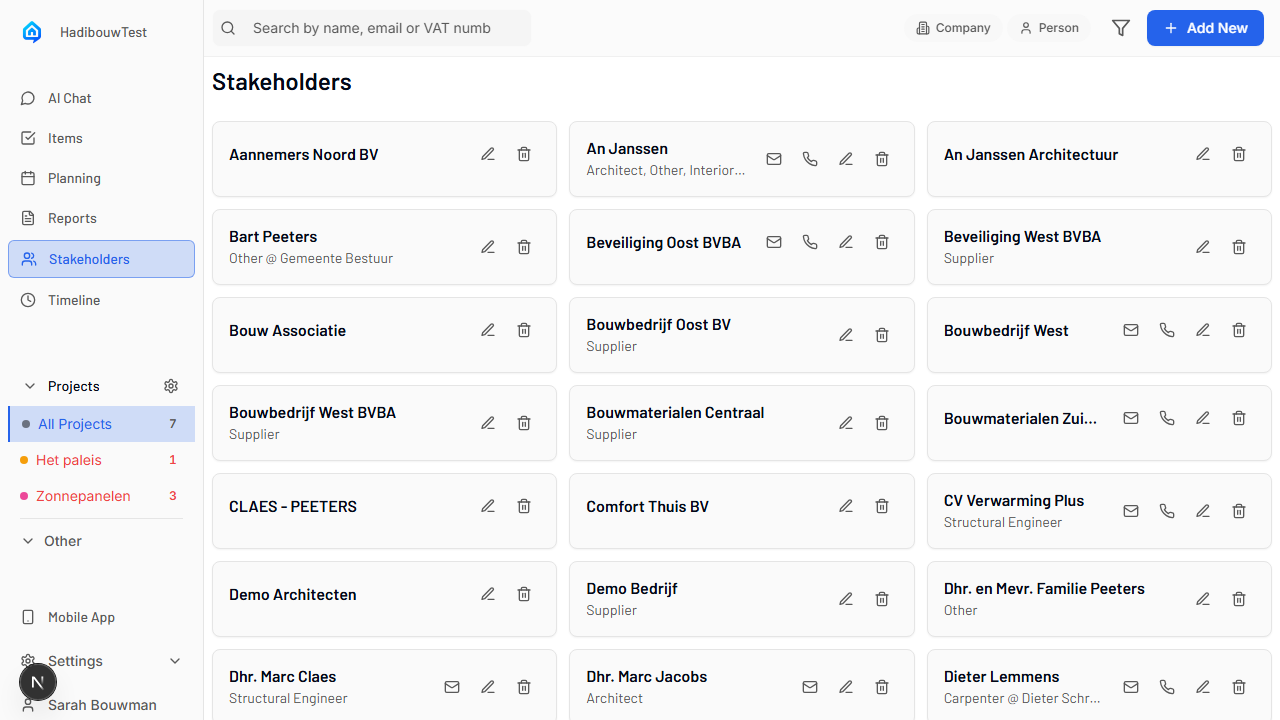
What you see: - Companies – Contractors, suppliers, and other businesses - People – Individual contacts linked to companies - Roles – Architect, Supplier, Structural Engineer, etc.
Features: - Filter by Company or Person - Search by name, email, or VAT number - Click a stakeholder to view details - Add new stakeholders with the Add New button
Access: Click Stakeholders in the navigation bar.
Creating Your First Project
Projects organize everything – items, documents, team members, and settings.
Quick setup:
- Click the New Project button
- Enter a clear project name (e.g. “Office Building Renovation”)
- Add a location (optional but recommended)
- Click Create
After creation:
- Connect Dropbox or OneDrive so documents sync automatically
- Invite your team
- Upload the first documents
For full details, see the Projects Guide →.
Creating Your First Item
Items are the core of SiteWhiz – tasks, issues, observations, and decisions.
Fastest way (desktop):
- Click the + New Item button
- Enter a clear title (e.g. “Fix water leak in bathroom”)
- Press Enter or click Save
The AI automatically suggests type, priority, and discipline based on your title.
For all ways to create items (desktop, document AI, mobile, voice), see the Creating Items Guide →.
Using the AI Assistant
Have a question about your project? Ask the AI – it searches all your documents, items, and data instantly.
Example questions:
- “Which items are urgent for the electrician?”
- “Show me water damage photos from last week.”
- “What is the status of the foundation work?”
- “Find the quote from ABC Plumbing.”
Natural Language
Ask questions as if you were talking to a colleague – no special syntax or commands needed.
For detailed instructions (opening chat, best practices, examples per use case), see the AI Assistant Guide →.
Installing the Mobile App
Use SiteWhiz on site to capture issues with voice notes and photos – no typing required.
Quick install (iOS):
- Open Safari, go to
app.sitewhiz.eu - Tap the Share button
- Choose “Add to Home Screen”
- Tap “Add”
Quick install (Android):
- Open Chrome, go to
app.sitewhiz.eu - Tap the menu (3 dots)
- Choose “Add to Home screen”
- Tap “Add”
Progressive Web App
SiteWhiz is a PWA – no App Store needed, works offline, and updates automatically.
For detailed installation steps and all voice/photo workflows, see the Mobile App Guide →.
What Now?
Now that you’re set up, explore the main workflows:
| I want to… | Go to… |
|---|---|
| Set up cloud storage and email sync | Projects: Setup |
| Understand the project overview | Projects: Daily Use |
| Learn more about items and workflows | Items Overview |
| Create items via voice or photos on mobile | Mobile App Guide |
| Ask questions about my project | AI Assistant Guide |
| View reports | Reports Guide |
Getting Help
Need help?
- Email: joke@sitewhiz.eu (we usually respond within 2 hours on weekdays)
- Troubleshooting: See the Troubleshooting Guide for common issues
Feedback Welcome
We’re constantly improving SiteWhiz. If you have ideas, feature requests, or run into problems, let us know – we read every message.